Since I only tend to do this once every time I get a new MacBook, I decided to document the procedure here so I don’t have to google it every time!
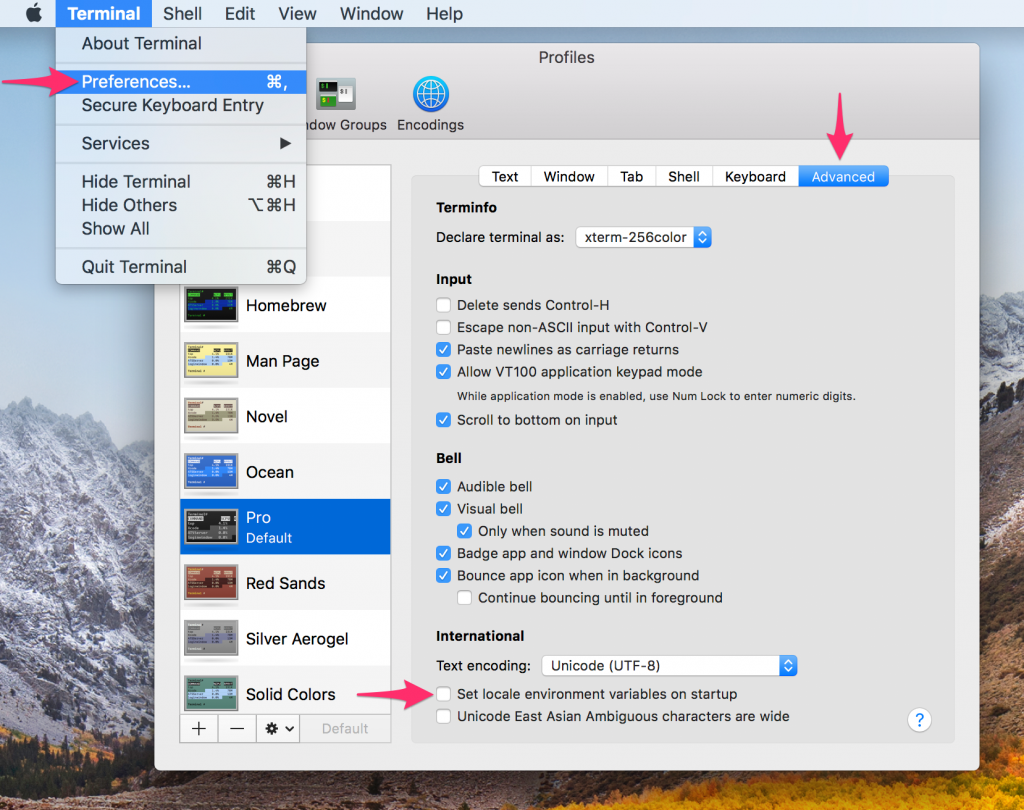
- Open Terminal
- Open Preferences ⌘,
- Goto Advanced
- Uncheck “Set locale environment variables on startup”

Since I only tend to do this once every time I get a new MacBook, I decided to document the procedure here so I don’t have to google it every time!

Simon Holmbring
Disclaimer: The information provided on this blog is for general informational and educational purposes only. All views and opinions expressed are those of the author and do not represent the opinions of any organization or employer. While efforts are made to ensure accuracy, no guarantee is given that the information is complete or up to date. The author is not responsible for any losses, injuries, or damages resulting from the use or reliance on this blog’s content. Readers are encouraged to verify information independently before making decisions based on it.