Hi future me (and anyone else who stumbled upon this page), this is how you turned on three finger drag:
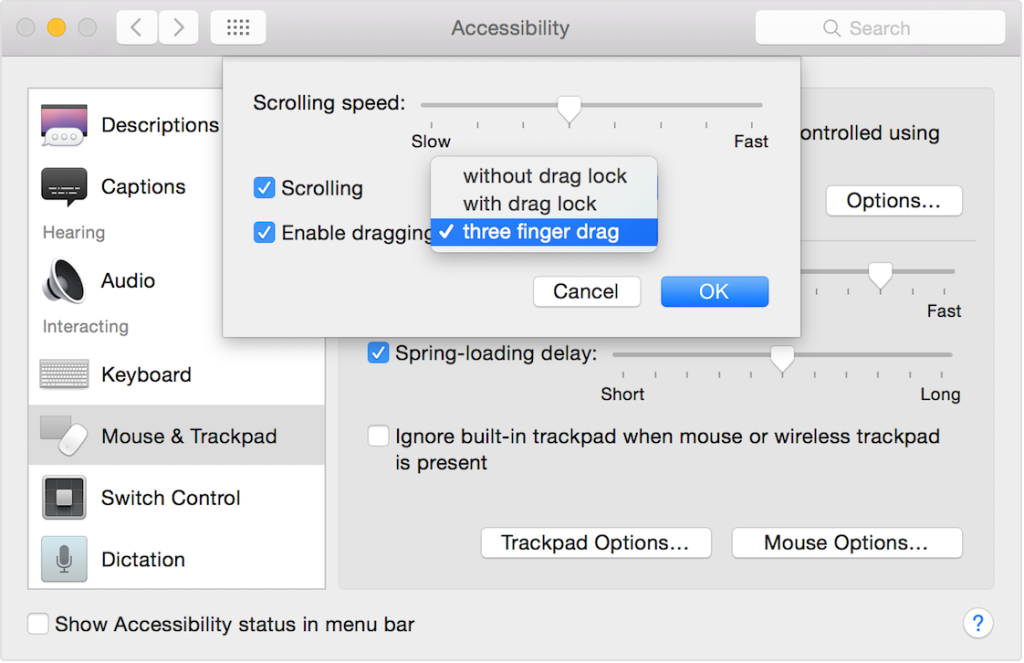
Yes I know, you thought it was under “Trackpad” in Preferences, but Apple hide this setting under Accessibility.

Hi future me (and anyone else who stumbled upon this page), this is how you turned on three finger drag:
Yes I know, you thought it was under “Trackpad” in Preferences, but Apple hide this setting under Accessibility.

Simon Holmbring
Disclaimer: The information provided on this blog is for general informational and educational purposes only. All views and opinions expressed are those of the author and do not represent the opinions of any organization or employer. While efforts are made to ensure accuracy, no guarantee is given that the information is complete or up to date. The author is not responsible for any losses, injuries, or damages resulting from the use or reliance on this blog’s content. Readers are encouraged to verify information independently before making decisions based on it.